PROMPT GUIDES · 2026-09-26
What if my prompt description conflicts with the optional settings?
Treat the task description as the source of truth, then remove or change any optional setting that contradicts it before you copy the prompt. PromptSprite labels task-specific requirements as higher priority, but a cleaner prompt is easier to review and less dependent on a downstream model resolving mixed instructions correctly.
Audit this prompt before using it. List every conflict between TASK, CONTEXT, REQUIREMENTS, and OUTPUT. For each conflict, quote the two competing instructions, choose the instruction that reflects the confirmed user request, and remove or rewrite the other one. Do not silently guess. If the intended priority is unclear, ask one focused question. Return the cleaned prompt followed by a short change log.
Try it in the prompt generator →
What happened in the PromptSprite browser test
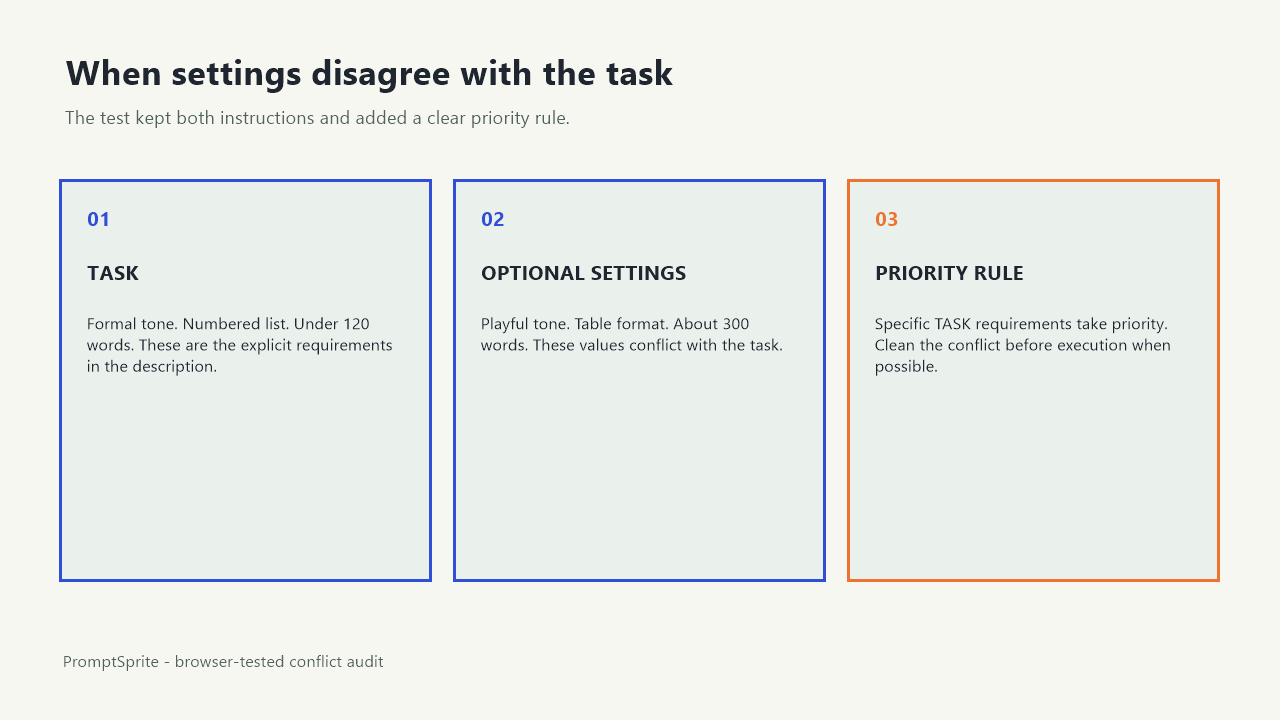
On September 26, 2026, we entered one deliberately contradictory request: Write a product launch brief as a numbered list. Use a formal tone and keep the response under 120 words.
We then selected Playful tone, Table format, and About 300 words in the optional settings.
The generated prompt preserved the task sentence exactly. It also preserved the conflicting defaults as separate requirements: Tone or style: Playful, Length: About 300 words, and Present the result as Table. It added a priority rule: Specific requirements in TASK take priority over optional defaults.
The test therefore shows how this rule-based builder represents a conflict. It does not show how every model will interpret the resulting prompt. No downstream model was called, no final launch brief was produced, and no compliance rate was measured.
Priority labels help, but cleaning the conflict is safer
The generated priority sentence gives the next tool a reasonable order: follow the concrete task before optional defaults. In the test, that means a formal numbered list under 120 words should win over Playful, Table, and About 300 words.
Still, the prompt asks the recipient to notice and resolve three contradictions. That adds work and creates room for inconsistent interpretation. One model may follow the task wording. Another may emphasize the labeled OUTPUT section. A person reviewing the result may not know which instruction was intentional.
Remove the disagreement before execution when you can. Set the tone to Professional or rewrite the task if another tone is intended. Change the result format to Numbered steps. Choose About 100 words or As needed, then keep the explicit 120-word ceiling in the task. The goal is one clear instruction for each decision.
Resolve each conflict against the confirmed request
| Decision | Task says | Optional setting says | Clean action |
|---|---|---|---|
| Tone | Formal | Playful | Change the setting to Professional, or revise the task if Playful was actually intended. |
| Structure | Numbered list | Table | Select Numbered steps and remove the competing table instruction. |
| Length | Under 120 words | About 300 words | Use About 100 words or As needed while keeping the exact ceiling in TASK. |
This table uses the values from the saved browser test. It is not a universal map from every label to every task. The confirmed user request decides the clean action. When that request is ambiguous, ask rather than choosing a preference on the user's behalf.
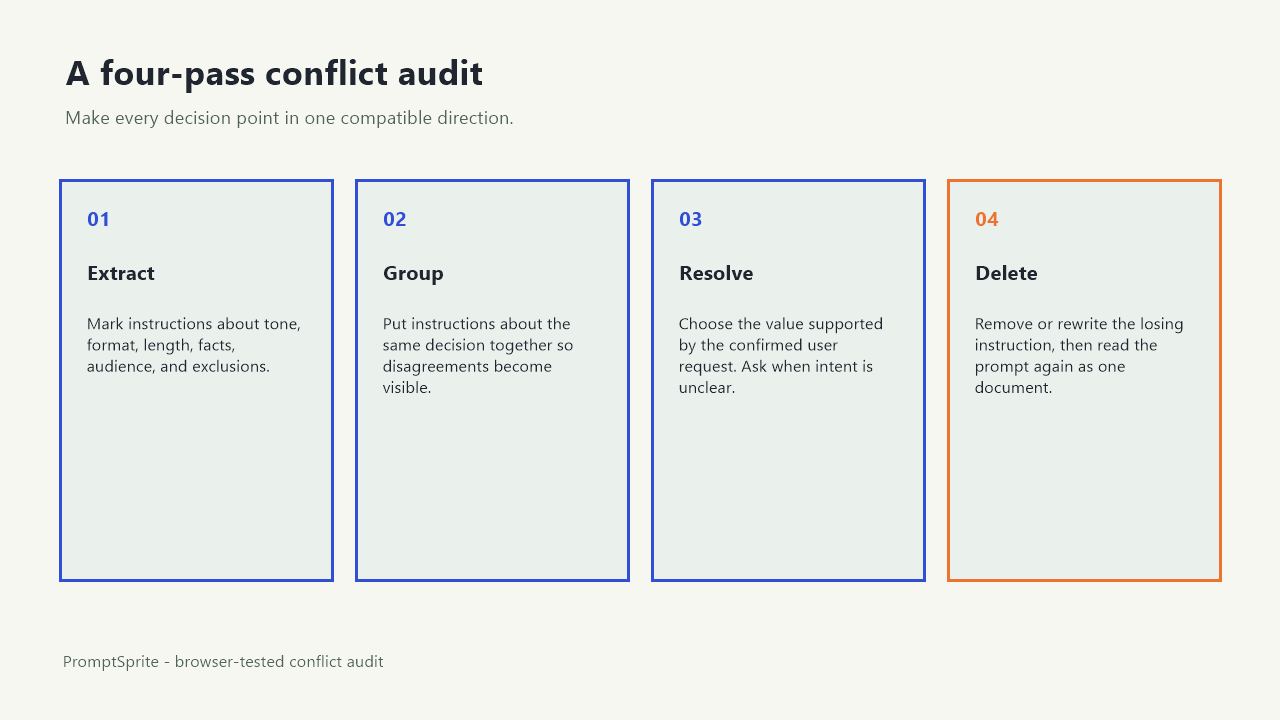
Use a four-pass conflict audit
- Extract decisions. Mark every instruction about tone, audience, format, length, facts, exclusions, and deliverable type.
- Group instructions by decision. Put all tone instructions together, all format instructions together, and so on. A conflict becomes visible when one group contains incompatible values.
- Choose the sourced requirement. Prefer the value that reflects the confirmed task. Do not assume that a dropdown is newer or more authoritative merely because it appears in a labeled section.
- Delete the losing instruction. A priority note can remain as a safeguard, but the prompt should not depend on it for a conflict you already found.
After editing, read TASK, REQUIREMENTS, and OUTPUT as a single document. Check that each decision now has one compatible direction. Then regenerate if the builder owns those sections, or edit the prompt directly if you are reviewing copied text.
Before and after: cleaning the tested prompt
Before
TASK
Write a product launch brief as a numbered list. Use a formal tone and keep the response under 120 words.

REQUIREMENTS
- Tone or style: Playful.
- Length: About 300 words.

OUTPUT
Present the result as Table.
After
TASK
Write a product launch brief as a numbered list. Use a formal tone and keep the response under 120 words.

REQUIREMENTS
- Tone or style: Professional.
- Length: About 100 words.

OUTPUT
Present the result as Numbered steps.
The cleaned version preserves the three task choices and aligns the optional settings with them. It does not add product facts, audience details, or claims that were not supplied. If those details are essential, the next step is a focused question, not an invented launch brief.
What this page proves and what remains unknown
We verified one public PromptSprite run in Chrome and saved its exact input, settings, and generated prompt. The observed priority rule is part of that prompt. The examples and audit method on this page are author-written analysis of the recorded conflict.
We did not run the prompt through an AI model, compare model responses, or test every combination of settings. A clear prompt can still produce an incorrect answer, and a conflicting prompt may sometimes appear to work. Review the actual response for facts, format, and constraints in the tool where you execute it.
You can inspect the exact browser-test record. Repeat the audit whenever a task sentence, copied template, system instruction, or interface setting supplies a different value for the same decision.
Questions and answers
Do task instructions always override optional settings?
PromptSprite adds that priority rule to its generated prompt. Other tools may use different rules, so inspect the prompt they actually produce.
Can I keep both instructions and rely on the priority sentence?
You can, but removing a known conflict makes the prompt easier to review and gives the recipient one clear direction.
What if I do not know which instruction is correct?
Do not guess. Quote the competing instructions and ask one focused question about tone, format, length, or the other disputed decision.
Original PromptSprite browser test and author-written conflict audit. No downstream model was called, and no model-compliance rate is claimed.
Watch the walkthrough
Original diagram walkthrough with synthetic English narration. The product-launch scenario is a browser-test case, not a model response.